

Posted by Tarun Arora
on May 02, 2025

How to adjust
your office chair
Ergonomic office chairs are an essential piece of furniture for any office. They are designed to give you optimum comfort and support while you’re at work and help reduce the risk of injury and fatigue. There are a number of different features and adjustments that you can make to an ergonomic office chair to ensure it is right for you. In this article, we’ll explore the various features and ways you can adjust your chair.
Features Of An Ergonomic Office Chair
An ergonomic office chair should have adjustable features for ultimate comfort and safety. Poor posture can lead to a range of health issues from neck and back pain to poor circulation, headaches and eye strain. An ergonomic chair with adjustable features is designed to give you the best support and comfort while you work and reduce the risk of these health issues. These features generally include:
Seat Height: Allows for adjustment of the height of the chair to ensure it fits comfortably underneath the desk and to accommodate for different user heights.
Seat Pan Depth: Allows for the chair to be adjusted to fit the user comfortably, reducing pressure on the legs and back.
Lumbar Support: Allows for additional support to the user’s lower back.
Backrest Angle: Allows for the angle of the backrest to be adjusted to maintain an ergonomic posture.
Armrest Height And Tilt: Allows for adjustment of the armrests to help support the forearms of the user.
How To Adjust An Office Chair For Your Height
Adjust The Seat Height
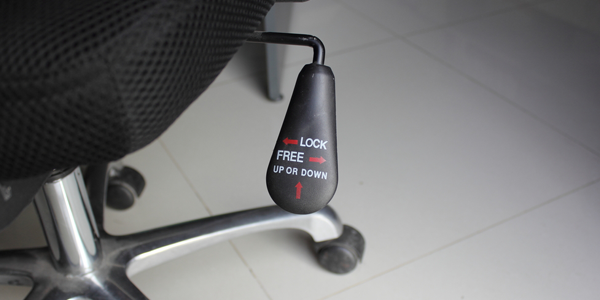
This explains the method for adjusting the height of a chair's seat. The chair's mechanism, located beneath the seat cushion, is fitted with a pneumatic cylinder, enabling swift and effortless height adjustment within a designated range. To effect this adjustment, a paddle or lever is typically situated beneath the seat cushion on either the right or left side of the chair. The perfect seat height for an office chair should be at a level that allows your feet to rest flat on the floor and your thighs to be parallel to the floor. You should also be able to sit up straight with your arms bent at a 90 degree angle and your elbows resting comfortably on the armrests.
To adjust the seat height:
1. Locate the lever under the seat and move it accordingly.
2. If the chair has a gas lift mechanism, use the lever to raise or lower the seat.
3. Experiment with different heights until you find the most comfortable and ergonomic position.
4. Make sure you can reach the floor with your feet and that your back is straight and supported.
If your feet are not flat on the floor, you should use a footrest to raise them to the right level.
Adjust The Seat Pan Depth

The perfect seat pan depth for good posture is one that allows a inch or two of space between the back of the knee and the edge of the seat when you sit all the way back in the chair with your feet flat on the floor. The seat pan should also be slightly curved inwards to provide lumbar support, and it should be wide enough to support your entire thighs without placing unnecessary pressure on the backs of the thighs. Additionally, if the seat can be adjusted, the ideal seat angle is slightly reclined (110 to 120 degrees) to provide support for the spine's natural curve.
To adjust the seat pan depth:
1. Look for a knob, lever, or switch on the underside of the seat. This is usually a lever-style mechanism.
2. Use the lever or switch, or turn the knob until the seat pan depth is adjusted to your desired setting.
3. If there is no lever, switch or knob, look for a small screw underneath the seat cushion.
4. Using a screwdriver, turn the screw clockwise until the seat pan depth is adjusted to your desired setting.
Adjust The Lumbar Support

Lumbar support in an office chair refers to the feature that supports the lower back region of the spine. The lumbar spine, located in the lower back, has a natural inward curve that can become strained or flattened when sitting for extended periods without proper support. Lumbar support in an office chair is designed to maintain the natural curve of the lower back and alleviate any discomfort or pain that may arise from poor posture or prolonged sitting. The lumbar support feature can take various forms, such as a contoured backrest, an adjustable cushion, or a built-in mechanism that adjusts to the shape of the user's back.
To adjust the lumbar support:
1. First locate the lumbar lever for the back of the chair. This lever will typically be located underneath the seat and chair back.
2. Pull the lever up and move the lumbar support cushion up or down until it fits snugly to the curve of your lower back.
3. The cushion should provide comfortable support without putting unnecessary pressure on any of your spine’s vertebrae. You may need to readjust the lumbar support cushion a few times to find the best fit for your back.
Some office chairs come with an inflatable lumbar support. To adjust this, locate the inflatable lumbar support pump on the chair. To adjust the lumbar support, simply press the pump to inflate the cushion. To decrease the support, press the pump again to deflate the cushion. Most of the ergonomic office chairs here at Southern Office Furniture utilise an inflatable lumbar support.
Adjust The Height Of The Backrest

The backrest should be adjusted to fit the height of your back. If the backrest is too low, it may not provide enough support, which can lead to fatigue and poor posture. An adjustable backrest can help to improve posture by encouraging the user to sit up straight, which can improve circulation and help to reduce discomfort.
To adjust the height of the backrest:
1. Find the adjustment lever on the side of the chair. This should be located near the base or the back of the chair.
2. Push or pull the lever to adjust the height of the backrest. Depending on the chair, this might mean pushing or pulling up or down or side to side.
3. Check the adjustment by sitting in the chair. The backrest should be at an angle that supports your back in a comfortable way. You should also be able to sit up straight without slouching.
Adjust The Angle Of The Backrest To Fit Your Back

Most ergonomic office chairs have adjustable backrest angles. This should be adjusted so it fits the natural curve of your spine and provides maximum comfort and support.
1. Locate the lever on the back of the office chair.
2. Depending on the type of lever present, either pull the lever or turn the knob to the desired angle to unlock it.
3. Test the angle of the backrest by sitting in the chair and looking comfortably at your monitor.
4. When the desired angle is achieved, lock the backrest into place.
Not all ergonomic chairs will allow you to adjust the backrest.
Adjust The Armrests Of The Chair

Armrests provide a place to rest your forearms, which in turn help reduce strain and fatigue on your shoulders, neck and back. They should be adjusted so your elbows are at 90 degrees to your desk.
To adjust the armrests on an office chair:
1. Locate the armrest adjustment lever, usually located on the side of the chair or at the base of the armrest.
2. Pull the lever and adjust the armrest to the desired height.
3. Once the armrest is at the desired height, release the lever to lock it in place.
4. Repeat the above steps for the other armrest.
Not all ergonomic chairs will allow you to adjust the armrest height.
Assess Your Resting Eye Level

Finally, you should assess your resting eye level. You should be able to comfortably read from your monitor without having to strain your eyes or neck. An ergonomic office chair should be adjustable for height so you can find the right position for your monitor.